How to get an API key
Copy encrypted Solana and EVM API keys from J7Tracker for POST /submit.
1. Open Deploy Settings
Open Deploy Settings after logging in to your J7Tracker account.

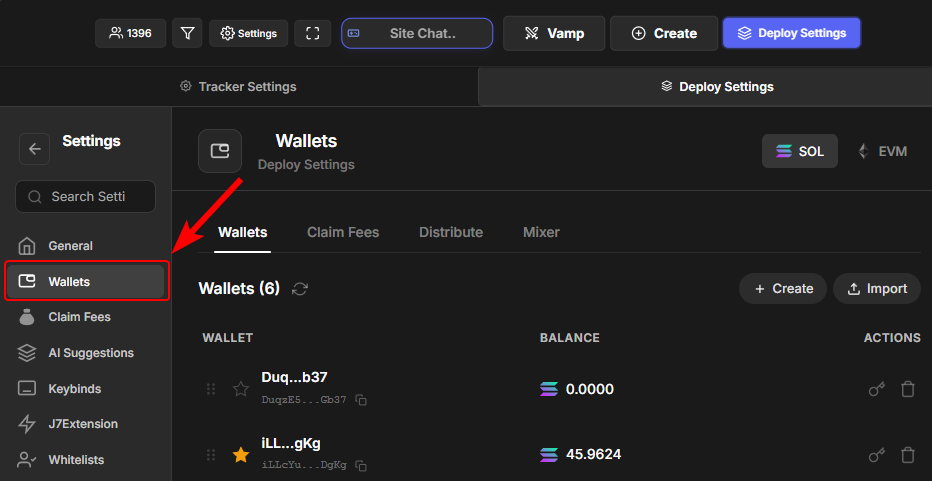
2. Select the Wallets page
Open the Wallets page from Deploy Settings.
3. Click the key icon on that wallet
Click the key icon on the wallet you want the API key for. Each wallet has its own API key — treat it like the signing key for that wallet. It is not one key for your whole account and not shared across all your wallets.
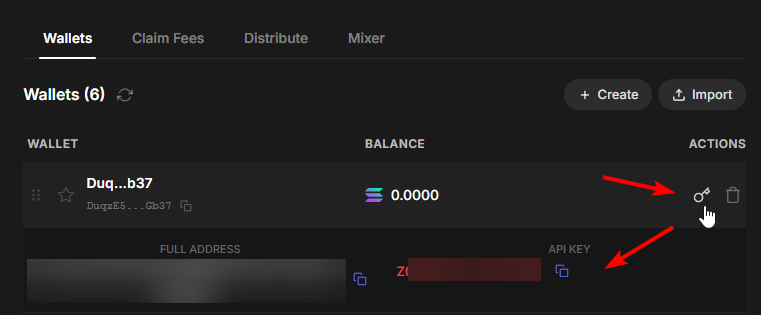
When you call POST /submit, use the encrypted string from the wallet that matches the chain you are deploying on:
- Solana wallet key — for
pump,bonk,bags,usd1, and other Solana modes inapi_key(and the same format inbundle_wallets/sniper_walletsif you use those). - EVM wallet key — for
bnb,nadfun, andclankerinapi_keyonly.
Do not paste raw private keys into the API. Only the encrypted strings the app shows for that wallet.